From this content, let's explore how to automate repetitive tasks using fzf. With this automation as a foundation, you will be able to save time and enhance productivity.
This article discusses how to efficiently automate repetitive tasks through various function examples.
It describes the reasons for creating the function, explains the function, and showcases the screen display.
Of course, as company data must not be exposed, it is appropriately displayed using fake data.
The functions listed below demonstrate how repetitive tasks occurring during development can be efficiently improved using fzf.
ec2-connect: A function to view EC2 instance lists by region, select them, and easily connect via SSHs3-download: A function to explore S3 buckets and file lists interactively to easily download the desired filesjpr: A function to directly view related JIRA issues based on the branch name from the GitHub PR list in the terminalgs: A function to manage the git stash list with a preview and easily handle apply/pop/drop operationsgpr: A function that helps quickly start code reviews by selecting a team member's PR and automatically checking out to the relevant branchspring-loggers: A function that connects to a running Spring application and allows real-time changes to the level of specific loggersOur team uses spot instances in various regions to use GPU instances cost-effectively.
Sometimes, an instance must be accessed to check the instance's status or file system status.
Spot instances can turn on and off at any time, so the instance ID and IP may change, which can be difficult for developers to remember every time.
Therefore, by selecting a specific region, it shows the list of active EC2 instances and allows access by selection.
function ec2-connect() {
    local regions=(
        "ap-northeast-2 (Seoul, Seoul)"
        "us-east-1 (N. Virginia, N. Virginia)"
        "eu-west-2 (London, London)"
        "eu-north-1 (Stockholm, Stockholm)"
        "us-west-2 (Oregon, Oregon)"
        "sa-east-1 (São Paulo, São Paulo)"
    )

    local selected_region_display
    selected_region_display=$(printf "%s\n" "${regions[@]}" | fzf --prompt="Select AWS Region > ")
    if [[ -z "$selected_region_display" ]]; then
        echo "No region selected."
        return 1
    fi
    local selected_region_code="${selected_region_display%% *}"

    local instance_info
    instance_info=$( \
        aws ec2 describe-instances --profile mfa --region "$selected_region_code" \
            --filters "Name=tag:Name,Values=*ai-service*" "Name=instance-state-name,Values=running" \
            --query 'Reservations[].Instances[].[InstanceId, PublicIpAddress, PrivateIpAddress, InstanceType, Tags[?Key==`Name`]|[0].Value, State.Name]' \
            --output text \
        | fzf --prompt="Select EC2 in [$selected_region_display] > " --header="ID | Public IP | Private IP | Type | Name | State"
    )

    if [[ -n "$instance_info" ]]; then
        local instance_ip
        instance_ip=$(echo "$instance_info" | awk -F'	' '{print $2}')
        local instance_name
        instance_name=$(echo "$instance_info" | awk -F'	' '{print $5}')

        if [[ -z "$instance_ip" || "$instance_ip" == "None" ]]; then
            echo "Selected instance has no public IP. Cannot SSH."
            return 1
        fi

        echo "Connecting to $instance_name at $instance_ip..."
        ssh -o StrictHostKeyChecking=no -i "/Users/iyeongsu/.ssh/aws.pem" "ec2-user@$instance_ip"
    else
        echo "No instance selected."
    fi
}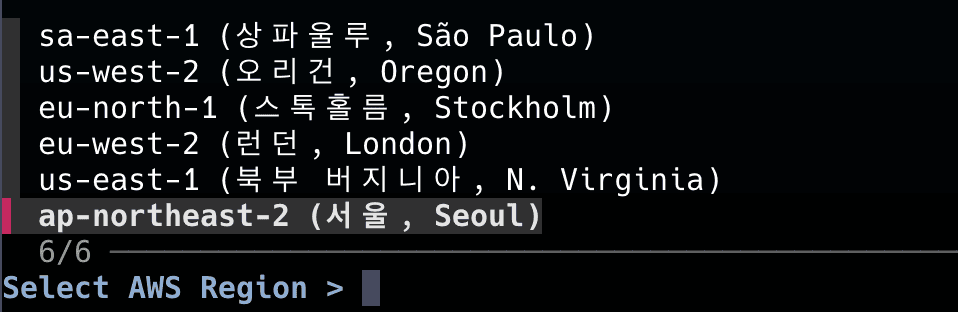
ap-northeast-2 (Seoul, Seoul), remove the elements after the space - ${selected_region_display%% *}ai-service in the name + with a running stateaws ec2 describe-instances --region "$selected_region_code" \
--filters "Name=tag:Name,Values=*ai-service*" "Name=instance-state-name,Values=running" \
--query 'Reservations[].Instances[].[InstanceId, PublicIpAddress, PrivateIpAddress, InstanceType, Tags[?Key==`Name`]|[0].Value, State.Name]' \
--output text
It's divided into two modes.
Mode 1 is when the URL is known; it's a mode for fast download (download directly from the S3 path in the logs).
Mode 2 is an interactive mode that allows selecting folders and files flexibly (useful when navigating into folders to find appropriate images).
function s3() {
    # Mode 1: If entered with an S3 URL, attempt immediate download
    if [[ -n "$1" ]]; then
        local s3_uri="$1"
        if [[ ! "$s3_uri" =~ ^s3:// ]]; then
            echo "❌ Invalid S3 URI. Must start with 's3://'."
            return 1
        fi
        local filename=$(basename "$s3_uri")
        echo "⬇️  Downloading $s3_uri to ./$filename..."
        aws s3 cp "$s3_uri" "./$filename"

        if [[ $? -eq 0 ]]; then
            echo "✅ Download complete: ./$filename"
        else
            echo "❌ Download failed."
            return 1
        fi
        return 0
    fi

    # Mode 2: Interactive search
    # 1. Select bucket
    local bucket
    bucket=$(aws s3 ls | awk '{print $3}' | grep 'ai-service' | fzf --prompt="Select S3 Bucket > ")
    if [[ -z "$bucket" ]]; then
        echo "No bucket selected."
        return 1
    fi

    # 2. Get optional prefix for faster search
    echo "💡 For faster searching, enter a prefix (e.g., path/to/folder/2025/06/18/)"
    read -r "prefix?Prefix (optional): "

    # 3. Get optional filter keyword
    read -r "keyword?Keyword to filter by (optional): "

    # 4. List objects using prefix
    echo "🔍 Fetching objects from s3://$bucket/$prefix..."

    local object_keys
    if [[ -n "$prefix" ]]; then
        object_keys=$(aws s3api list-objects-v2 --bucket "$bucket" --prefix "$prefix" --query 'Contents[].Key' --output text | tr '\t' '\n')
    else
        echo "⚠️  No prefix entered. Listing all objects in the bucket. This might be very slow."
        object_keys=$(aws s3api list-objects-v2 --bucket "$bucket" --query 'Contents[].Key' --output text | tr '\t' '\n')
    fi

    # 5. Filter by keyword
    local filtered_keys="$object_keys"
    if [[ -n "$keyword" ]]; then
        filtered_keys=$(echo "$object_keys" | grep -i "$keyword")
    fi

    if [[ -z "$filtered_keys" ]]; then
        echo "No objects found for the given prefix/keyword."
        return 1
    fi

    # 6. Select object with fzf
    local object_key
    object_key=$(echo "$filtered_keys" | fzf --prompt="Select object to download > ")
    if [[ -z "$object_key" ]]; then
        echo "No object selected."
        return 1
    fi

    # 7. Download
    local filename
    filename=$(basename "$object_key")
    echo "⬇️  Downloading s3://$bucket/$object_key to ./$filename..."
    aws s3 cp "s3://$bucket/$object_key" "./$filename"

    if [[ $? -eq 0 ]]; then
        echo "✅ Download complete: ./$filename"
    else
        echo "❌ Download failed."
        return 1
    fi
}
Mode 1 is straightforward, so only Mode 2 is explained.
ai-service.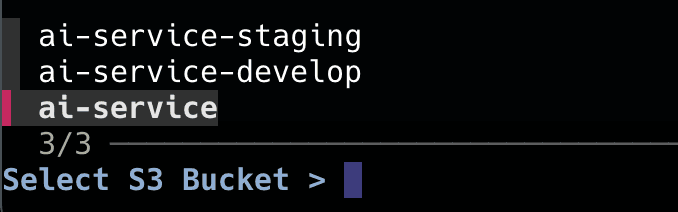
In other words, it accepts folder input first and then adds a keyword if you want to search for something.
For instance, if you only type up to a00/ai-service/original?
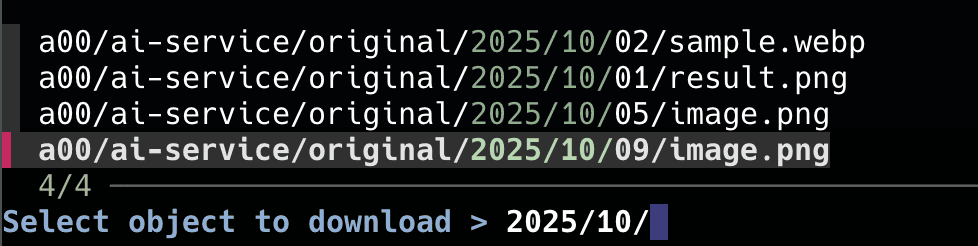
The object list appears like this (search appropriately for the desired item).
function jpr() {
    local selected_line
    selected_line=$(gh pr list --json headRefName,number,title,author,updatedAt \
        --template '{{range .}}{{.headRefName}}{{"\t"}}#{{.number}}{{"\t"}}{{.title}}{{"\t"}}{{.author.login}}{{"\t"}}{{.updatedAt | timeago}}{{"\n"}}{{end}}' | \
        fzf --ansi --prompt="Select PR Branch > " \
            --header="BRANCH | PR # | TITLE | AUTHOR | UPDATED")

    if [[ -n "$selected_line" ]]; then
        local branch_name
        branch_name=$(echo "$selected_line" | awk -F'\t' '{print $1}')
        local issue_key
        issue_key=$(echo "$branch_name" | rg -o "AI_SERVICE-[0-9]+")

        if [[ -n "$issue_key" ]]; then
            echo "🔍 Found Jira Issue: $issue_key from branch: $branch_name"
            jira issue view "$issue_key" | bat -
        else
            echo "No Jira issue key found in branch name: $branch_name"
        fi
    fi
}
If you want to view it on the website, use something like
open "https://{domain}/browse/$key"to open it directly.
function gs() {
    local selected_stash
    selected_stash=$(git log -g refs/stash --pretty=format:'%gd%x09%ci%x09%x09%s' \
        | fzf --reverse --prompt="Select Stash > " --header="ID | Date | Message" \
               --preview="git stash show -p {1} | bat --color=always --paging=never")

    if [[ -n "$selected_stash" ]]; then
        local stash_id
        stash_id=$(echo "$selected_stash" | awk '{print $1}')
        echo
        read -k1 "action? (a)pply, (p)op, (d)rop, or (c)ancel? "
        echo
        case "$action" in
            a|A) git stash apply "$stash_id" ;;
            p|P) git stash pop "$stash_id" ;;
            d|D) git stash drop "$stash_id" ;;
            *)   echo "Cancelled." ;;
        esac
    fi
}--pretty=format:'%gd%x09%ci%x09%an%x09%s': I extracted this part by asking AI.ID-Date-Author-Message.%gd: Reflog selector - outputs stash@{0}, stash@{1}, %x: tab, %ci: Committer date, %s: subject)
%cr: Outputs relative time


function gpr() {
    local pr_info
    pr_info=$(gh pr list --json number,title,author,headRefName,createdAt,updatedAt \
      --template '{{range .}}{{.number}}{{"\t"}}{{.title}}{{"\t"}}{{.author.login}}{{"\t"}}{{.createdAt | timeago}}{{"\t"}}{{.headRefName}}{{"\n"}}{{end}}' | \
      fzf --ansi --prompt="Select PR > " \
            --header="NUM | TITLE | AUTHOR | CREATED | BRANCH" \
            --preview="gh pr diff --color=always {+1}")

    if [[ -n "$pr_info" ]]; then
        local pr_number
        local branch_name
        # Extract PR number and branch name from tab-separated output using awk
        pr_number=$(echo "$pr_info" | awk -F'\t' '{print $1}')
        branch_name=$(echo "$pr_info" | awk -F'\t' '{print $5}')

        if [[ -z "$branch_name" ]]; then
            echo "Error: Couldn't retrieve branch name."
            return 1
        fi

        # --- Stash uncommitted changes ---
        # Before switching branches, check for unsaved changes and stash them.
        if [[ -n $(git status --porcelain) ]]; then
            local current_branch
            current_branch=$(git rev-parse --abbrev-ref HEAD)
            local stash_message="gpr-stash: '$current_branch' -> '$branch_name' temporary save"

            echo "There are unsaved changes on the current branch ('$current_branch'). Stashing them."
            echo "Stash message: \"$stash_message\""
            git stash -m "$stash_message"
            echo "Changes successfully stashed. You can restore them later with 'git stash pop'."
        fi
        # --- End of Stash logic ---

        # Check if the branch already exists locally.
        if git rev-parse --verify "$branch_name" >/dev/null 2>&1; then
            # If the branch exists, switch to it and pull the latest changes.
            echo "Branch '$branch_name' already exists. Switching to it."
            git checkout "$branch_name"

            # Set or update tracking to ensure git pull finds the tracking branch.
            echo "Setting/updating tracking for remote branch (origin/$branch_name)."
            if git branch --set-upstream-to="origin/$branch_name" "$branch_name"; then
                echo "Fetching latest changes for '$branch_name' branch..."
                git pull
            else
                echo "Error: Failed to set tracking for remote branch 'origin/$branch_name'."
                echo "If the PR is from a forked repository, remote settings might be different."
            fi
        else
            # If the branch doesn't exist, use 'gh pr checkout' to create a new branch.
            echo "Checking out PR #$pr_number..."
            gh pr checkout "$pr_number"
        fi
    fi
}
When we conduct code reviews, it's useful to see the code directly on your IDE.
Instead of moving through the existing flow: stash what you're doing -> git checkout (if there's no branch, git checkout -b) -> git pull, accomplish it solely by selecting the branch.
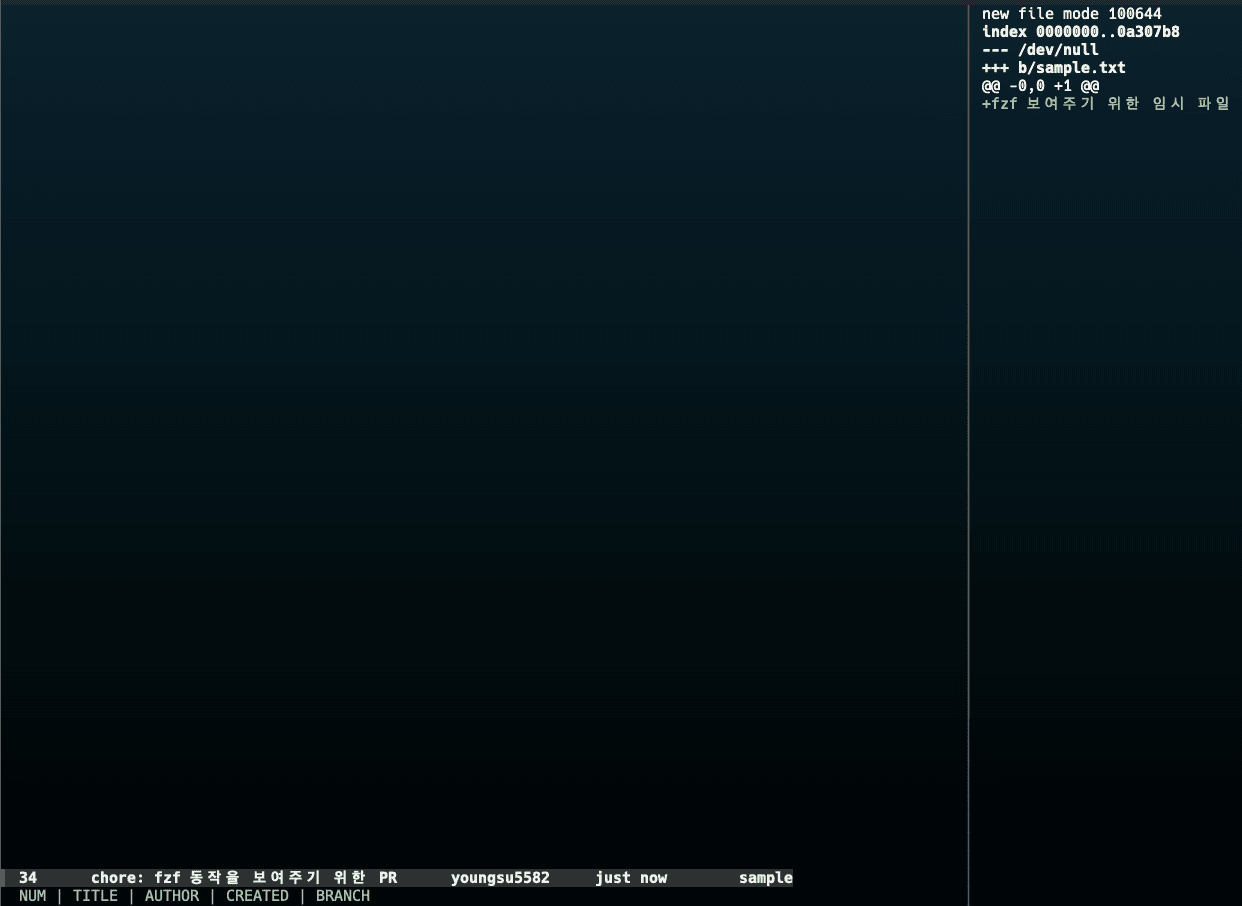
On the right, gh diff shows the lines transformed through the PR.
if [[ -n $(git status --porcelain) ]]; then
            local current_branch
            current_branch=$(git rev-parse --abbrev-ref HEAD)
            local stash_message="gpr-stash: '$current_branch' -> '$branch_name' temporary save"

            echo "There are unsaved changes on the current branch ('$current_branch'). Stashing them."
            echo "Stash message: \"$stash_message\""
            git stash -m "$stash_message"
            echo "Changes successfully stashed. You can restore them later with 'git stash pop'."
fiporcelain: Displays status in a machine-readable format (state code file path) - only checking for existence is necessary.If the branch exists, move and pull the latest changes.
If the branch does not exist, use pr checkout to bring the latest changes.
if git rev-parse --verify "$branch_name" >/dev/null 2>&1; then
	# If the branch exists, switch to it and pull the latest changes.
	echo "Branch '$branch_name' already exists. Switching to it."
	git checkout "$branch_name"

	# Ensure git pull finds the tracking branch.
	echo "Setting/updating tracking for remote branch (origin/$branch_name)."
	if git branch --set-upstream-to="origin/$branch_name" "$branch_name"; then
		echo "Fetching latest changes for '$branch_name' branch..."
		git pull
	else
		echo "Error: Failed to set tracking for remote branch 'origin/$branch_name'."
		echo "If the PR is from a forked repository, remote settings might be different."
	fi
else
	# If the branch doesn't exist, use 'gh pr checkout' to create a new branch.
	echo "Checking out PR #$pr_number..."
	gh pr checkout "$pr_number"
fiLet's achieve this more neatly through functions this time.
function spring-target() {
    local targets=(
        "local-boot (http://localhost:8080)"
        "dev-server (http://dev.my-service.com)"
        "staging-server (http://staging.my-service.com)"
        "Enter custom target..."
    )

    local selected_target
    selected_target=$(printf "%s\n" "${targets[@]}" | fzf --prompt="Select Spring App Target > ")

    if [[ -z "$selected_target" ]]; then echo "❌ Canceled."; return 1; fi

    if [[ "$selected_target" == "Enter custom target..." ]]; then
        read "custom_target?Enter Actuator URL (e.g., http://localhost:8080): "
        if [[ -z "$custom_target" ]]; then echo "❌ Canceled."; return 1; fi
        export SPRING_ACTUATOR_TARGET="$custom_target"
    else
        export SPRING_ACTUATOR_TARGET=$(echo "$selected_target" | grep -o 'http://[^)]*')
    fi

    echo "✅ Target has been set: $SPRING_ACTUATOR_TARGET"
    spring-health
}
First, select the server to connect to. Then send requests to the actuator.
function spring-health() {
    _ensure_spring_target || return 1
    echo "🔍 Checking the health status of '$SPRING_ACTUATOR_TARGET'..."
    _curl_actuator "health" | jq . | bat -l json --paging=never
}

function _curl_actuator() {
    local endpoint="$1"
    local response
    local http_status

    # Receive response body and http status code via curl
    response=$(curl -s -w "\n%{http_code}" "$SPRING_ACTUATOR_TARGET/actuator/$endpoint")
    http_status=$(echo "$response" | tail -n 1)
    local body=$(echo "$response" | sed '$d')

    if [[ "$http_status" -ge 200 && "$http_status" -lt 300 ]]; then
        echo "$body" # Print only the body on success
        return 0
    else
        # Print error messages to standard error (stderr) on failure
        echo "❌ Error occurred! (Endpoint: /actuator/$endpoint, HTTP Status: $http_status)" >&2
        # Show error body returned by the server, if any
        echo "$body" | jq . >&2 2>/dev/null || echo "$body" >&2
        return 1
    fi
}
Send based on the path and determine by status code.
# Change the log level in real-time
function spring-loggers() {
    local loggers_json
    loggers_json=$(_curl_actuator "loggers") || return 1

    local logger_info
    logger_info=$(echo "$loggers_json" \
        | jq -r '.loggers | to_entries[] | "\(.key)\t\(.value.effectiveLevel)"' \
        | fzf --prompt="Select Logger to Modify > " --header="LOGGER | CURRENT_LEVEL")

    if [[ -z "$logger_info" ]]; then echo "❌ Canceled."; return 1; fi

    local logger_name
    logger_name=$(echo "$logger_info" | awk -F'\t' '{print $1}')

    local levels="DEBUG\nINFO\nWARN\nERROR\nOFF\nNULL (reset to default)"
    local selected_level
    selected_level=$(echo "$levels" | fzf --prompt="Select New Level for '$logger_name' > ")

    if [[ -z "$selected_level" ]]; then echo "❌ Canceled."; return 1; fi

    local level_payload
    if [[ "$selected_level" == "NULL"* ]]; then
        level_payload="null"
    else
        level_payload="\"$selected_level\""
    fi

    echo "🔄 Changing the log level of '$logger_name' to '$selected_level'..."

    local http_status
    http_status=$(curl -s -o /dev/null -w "%{http_code}" \
        -X POST -H "Content-Type: application/json" \
        -d "{\"configuredLevel\": $level_payload}" \
        "$SPRING_ACTUATOR_TARGET/actuator/loggers/$logger_name")

    if [[ "$http_status" -ge 200 && "$http_status" -lt 300 ]]; then
        echo "\n✅ Request successful (HTTP $http_status). Checking the changed log level..."
        _curl_actuator "loggers/$logger_name" | jq . | bat -l json
    else
        echo "\n❌ Error occurred! (HTTP $http_status)"
        echo "   - Ensure the actuator endpoint is active, and has write permissions."
    fi
}acutator/loggers.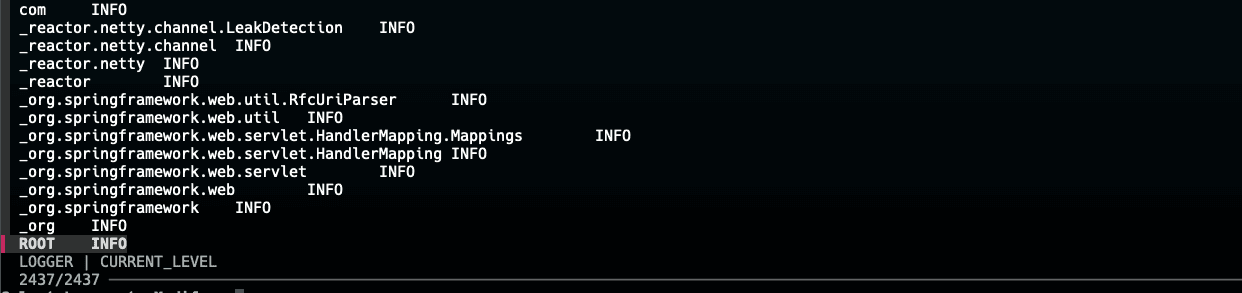
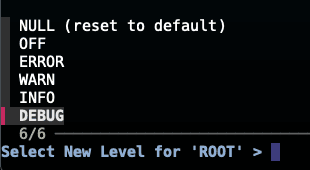
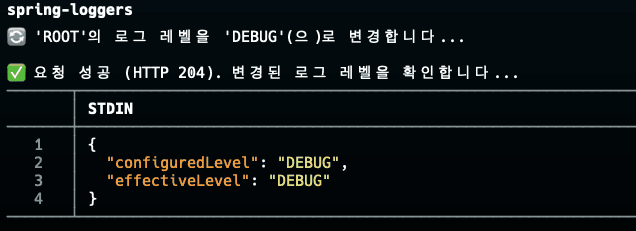

You can see it was successfully changed to debug!
How is it?
Doesn't it seem like you could create a really wide variety of functions?? 🤩
In fact, I have more functions that I use.
'Specific user Slack issue lookup', 'DB dump and insert locally', 'Log view based on trace-id', and 'Automating snapshot tests developed within the team', etc.
Briefly explain the flow for Specific User Slack Issues?
And so on, it's similar to the above.
Rather than writing down all these functions, I wanted to show the possibilities. The repetitive tasks your teams face will be diverse.
I believe there is potential to simplify these aspects through fzf or CLI tools!
(If it's something you unnecessarily do by typing commands in the terminal, or even Excel might be possible...?)
Especially, AI already deeply understands this context. It is based on open-source and is part of the long tradition of developers' terminal use.
Let's always strive toward value beyond simple work and development, fellow developers.