[Reference Materials]
In modern server application architectures, a messaging system is inevitable.
The purpose can vary, such as separating logic to improve response speed, ensuring stability and execution, and communicating with other application servers.
Many development teams will worry about which technology to use.
I too started with the question, "Why does our team use RabbitMQ instead of Kafka?"
In that process, I found my own answers that I wanted to share.
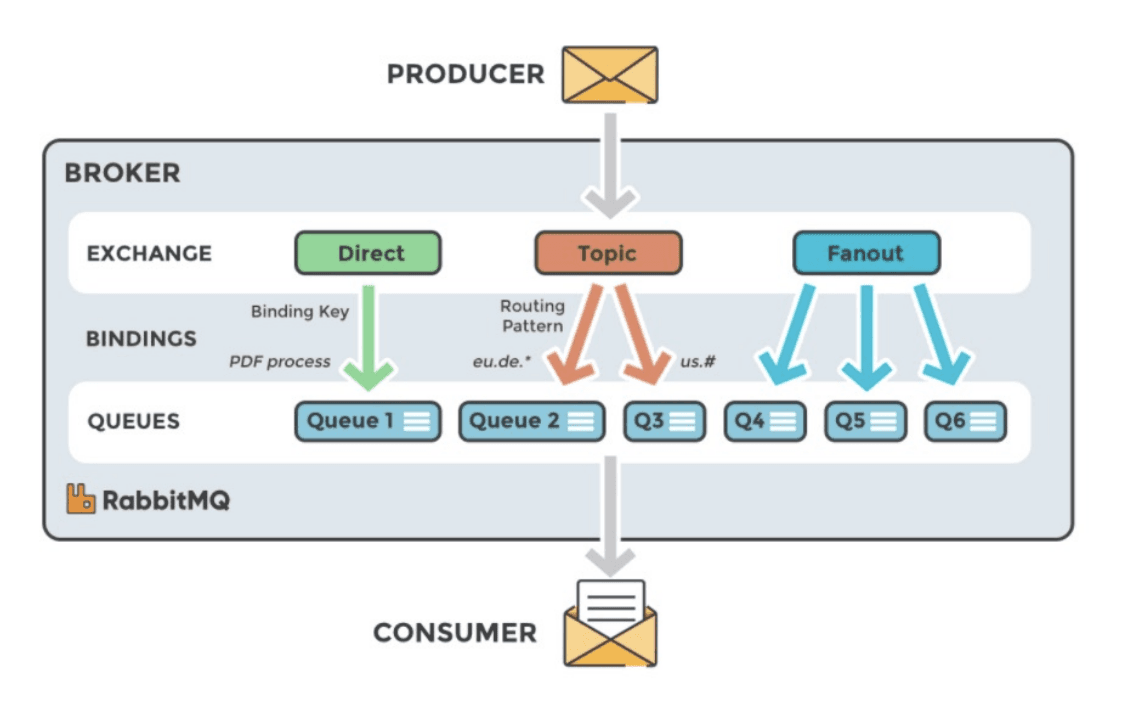
RabbitMQ is a message broker that implements AMQP (Advanced Message Queuing Protocol) and also provides the MQTT protocol.
The core idea is that the broker (RabbitMQ) handles most of the routing, message storage, and delivery logic.
AMQP?
Advanced Message Queueing Protocol: A standard protocol for message-oriented middleware.
It ensures reliable messaging between different systems and applications.
- Interoperability: Enables communication between systems developed on different languages and platforms.
- Reliability and Trustworthiness: Ensures messages are delivered without loss, with message acknowledgment (ACK), persistence, and transaction support.
- Flexible Routing: Routing through Exchange - producers send to Exchange, and Exchange distributes messages to the appropriate queue according to set rules.
Core Flow: Producer → Exchange → (Binding Rule) → Queue → Consumer
=> The post office (broker) categorizes and addresses all letters while the mail carrier (consumer) delivers the letters assigned to their zone.
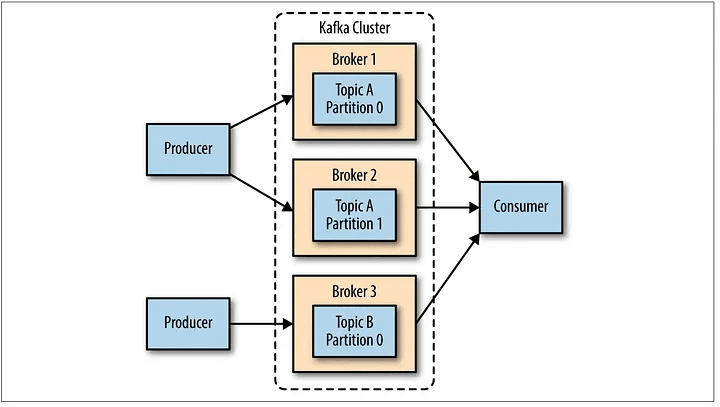
Kafka is a distributed streaming platform that treats messages as a consecutive stream of immutable logs.
The broker stores and manages data, with the consumer handling complex routing logic.
Broker: Kafka server instance that stores and manages messages and forms a Cluster when gathered with other brokers.
Cluster: Composed of multiple brokers, providing data replication, fault tolerance, and high availability.
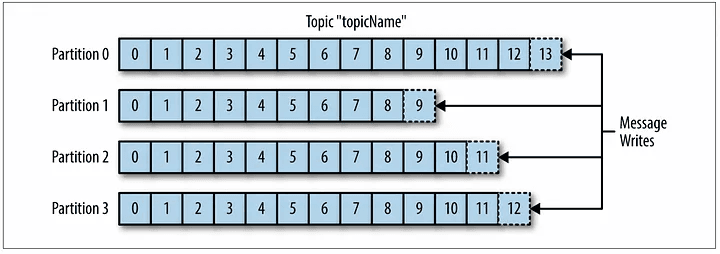
Producer: Creates messages (records) and sends them to a specific Topic.
Consumer: Retrieves and processes messages from the Topic.
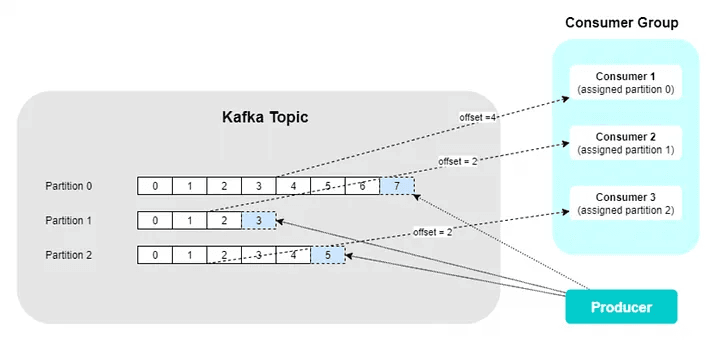
Offset: A unique serial number (ID) each message has within a partition. Consumers use offsets to track and control where they have read up to.
Consumer Group: A group of one or more consumers where each partition of a Topic is allocated to only one consumer within the group.
Adding more consumers than the number of partitions within a topic is meaningless.
Core Flow: Producer → Topic (Partition) → Consumer (Consumer Group)
=> A large library (broker) only continuously shelves books (messages) in bookcases (partitions), while readers (consumers) visit the library, remember what they have read (offset), and take the next book to read.
The Gemini analogy is good...!
There may be misconceptions that the two systems have similar structures and differ only in performance (or that RabbitMQ is a message system not used), but understanding these concepts clearly is essential to grasp the architectural philosophy differences between the two systems.
Fanout: A pattern where one message is delivered as identical copies to several independent consumers.
One of the most common misconceptions is the binary view that Kafka is Pub/Sub and RabbitMQ is Work-Queue.
In fact, Kafka elegantly integrates these two models through the concept of Consumer Groups.
Inter-Group: Pub/Sub (Fanout/Broadcast):
Different consumer groups can still independently consume the entire message stream even if they subscribe to the same topic.
EX) When there is a topic called order-events, groups like Inventory Management Service (Group A) and Data Analysis Team (Group B) can subscribe to it separately.
In this case, both groups can receive and process all messages from order-events from start to finish independently.
Intra-Group: Work-Queue (Distributed Processing):
Within a single consumer group, the story changes. Consumers within the group divide and process the partitions of the topic. (A partition is assigned to only one consumer within the group).
If there are 4 partitions in a topic and 4 consumers in the group, each consumer will be responsible for one partition and process messages.
-> This distributes workloads and increases throughput, matching the 'work queue' model.
Core: Kafka applies both methods through Consumer Groups: data replication/broadcast between different systems and distributed task processing within a single system to maximize throughput.
The fundamental difference between the two systems lies in how they handle messages.
Kafka: Data is an 'Immutable Log'
Kafka does not immediately delete messages once consumed. Messages are safely stored in the topic until the retention period (e.g., 7 days) or capacity is reached.
Consumers only manage an Offset that indicates 'where they have read up to'.
RabbitMQ: Data is 'Transient Task'
In traditional RabbitMQ, messages are 'tasks to be processed.' Once a consumer retrieves a message and confirms it has been processed (ack), the message is permanently removed from the queue.
This method features:
Note: RabbitMQ, adapting to the times, introduced a new queue type called Streams.
It provides offset-based non-destructive consumption similar to Kafka, operating like logs.
However, RabbitMQ is fundamentally used for the 'consume-remove' pattern.
RabbitMQ fanout operates differently from Kafka’s. The core of RabbitMQ's routing capabilities lies in the Exchange.
Producers send messages to Exchanges rather than directly to a Queue. Based on its type and rules, the Exchange determines which queue to send messages to.
fanout Exchange: Copies and sends messages to all queues bound to it. It's the purest form of broadcast model.topic Exchange: Matches routing keys with binding patterns using wildcards (*, #) and sends messages to queues meeting the criteria (multicast).direct Exchange: Sends messages only to queues whose binding key exactly matches the routing key (unicast).Core: In RabbitMQ, smart brokers (Exchange) interpret routing rules intelligently to distribute messages.
In contrast, in Kafka, producers specify topics, and smart consumers group together to fetch messages.
Now, let’s delve deeper into the specific functions and characteristics of the two systems across seven core themes.

Philosophy: Kafka regards the data as 'a record of facts' rather than 'temporary messages.'
Messages are stored based on retention.ms (time) or retention.bytes (capacity) settings.
auto.offset.reset = 'earliest' to read all events from the beginning of a topic.cleanup.policy=compact, Kafka retains only the latest value for each message key instead of storing all messages of a topic.Refer to the Kafka Log Compaction documentation.
RabbitMQ: Removal-based Task Queue
(ack).acked, free replay as in Kafka is not viable. To reprocess in case of failure, it either goes to Dead Letter Exchange (DLX) or is re-queued via consumer nack or reject.Kafka: Strict Order Guarantee by Partition
user_id as key ensures all user_id related events are sent to the same partition via hash calculation, ensuring all events are processed sequentially.)RabbitMQ: Uncertainty in Order with Competitive Consumer Environment
Controlling order in RabbitMQ is deceptively tough.. Let messages trigger subsequent messages to ensure order.
Kafka: Supports Exactly-Once Delivery
Refer to:
Exactly-Once Semantics Are Possible: Here’s How Kafka Does It
RabbitMQ: Defaults to At-least-once; Exactly-once falls on Application
auto-ack mode can result in message loss upon processing failure since the broker considers prompt reception as acknowledgment. (Requires careful application)But, At-least-once settings are far from bad.
It essentially guarantees that specific logic desired by the consumer will occur. Even if one consumer fails, another ensures it is processed correctly.
This means another message can fully integrate the process outcome into the DB.
Kafka: Consumer-led Pull Basis
poll() method call.poll(), leaving the data to await at the broker.max.poll.records (maximum number of messages fetched at once) and fetch.min.bytes (minimum data accumulation for response).RabbitMQ: Broker-led Push Basis + Prefetch
prefetch value (QoS - Quality of Service) to resolve this.prefetch setting.Setting RabbitMQ's
prefetchvalue is critical for performance and stability. A setting too small incurs frequent network round-trips reducing throughput, while too high risks consuming consumer memory.
(This can be crucial when certain domains, like an AI image generation logic using a GPU, require processing one task at a time;prefetch 1in such case)
As the content has been previously covered, I'll keep it brief.
Kafka: Simple Topology, Smart Client
RabbitMQ: Flexible Routing, Smart Broker
direct, topic, fanout, headers) and routing rules (binding).Kafka: Perfect Horizontal Scale via Partitions
RabbitMQ: Modern HA through Quorum Queues and Streams
Problems with the Leader-Follower Model?
- Bottleneck in writing: The message must reach leader queues first, waiting for follower replication and acknowledgment.
- Bottleneck in reading: Consumers can only connect to the leader for message retrieval.
=> Publishing and consumption traffic centers on a leader node.
Kafka: Data Pipeline Platform
Kafka extends beyond mere messaging brokers and acts as a comprehensive data platform in itself.
RabbitMQ: Versatile Message Broker
RabbitMQ feels more like a powerful broker tailored for specific purposes.
Reflective of AI-generated content and considerations on why our team uses RabbitMQ, it naturally might not hold true.
"Do you need to reprocess past data?"
"Does each message need to be routed differently based on complex criteria?"
"Is the primary purpose to handle background asynchronous tasks?"
"Do numerous independent services require consuming the same event stream for different purposes?"
"Is ultra-high throughput, like processing hundreds of thousands per second, mandatory?"
"Do you require per-message TTL, delayed operations, or request-response (RPC) patterns?"
Don’t fall into the mindset of defaulting to Kafka for message queuing systems.
It's a decision demanding consideration of the company's infrastructure, team technology, project requirements, and more.
Reasons why our team opts for RabbitMQ:
These points lead us to use RabbitMQ.