This post has been translated from Korean to English.
A new feature called Mod has appeared in Claude, and people's interest has been quite intense.
So, through the background knowledge needed to understand what Mod is and some example code,
I will organize what kinds of Mods can be made and how to make them.
Mod is JavaScript/TypeScript code that changes Claude Code's behavior and UI.
It is distinctly different from Skills and CLAUDE.md, and is similar to Hooks.
Before explaining Mod, I will organize some information to make it easier to understand.
Claude is a model. Requests and responses travel through the Anthropic API.
The reason Claude Code can also connect to other models is that its API endpoint can be configured arbitrarily.
It cannot read files or execute commands. It only asks, "Please execute this."
Claude Code is a program that runs on a computer. It connects the model and the computer.
They cooperate with each other in this way.
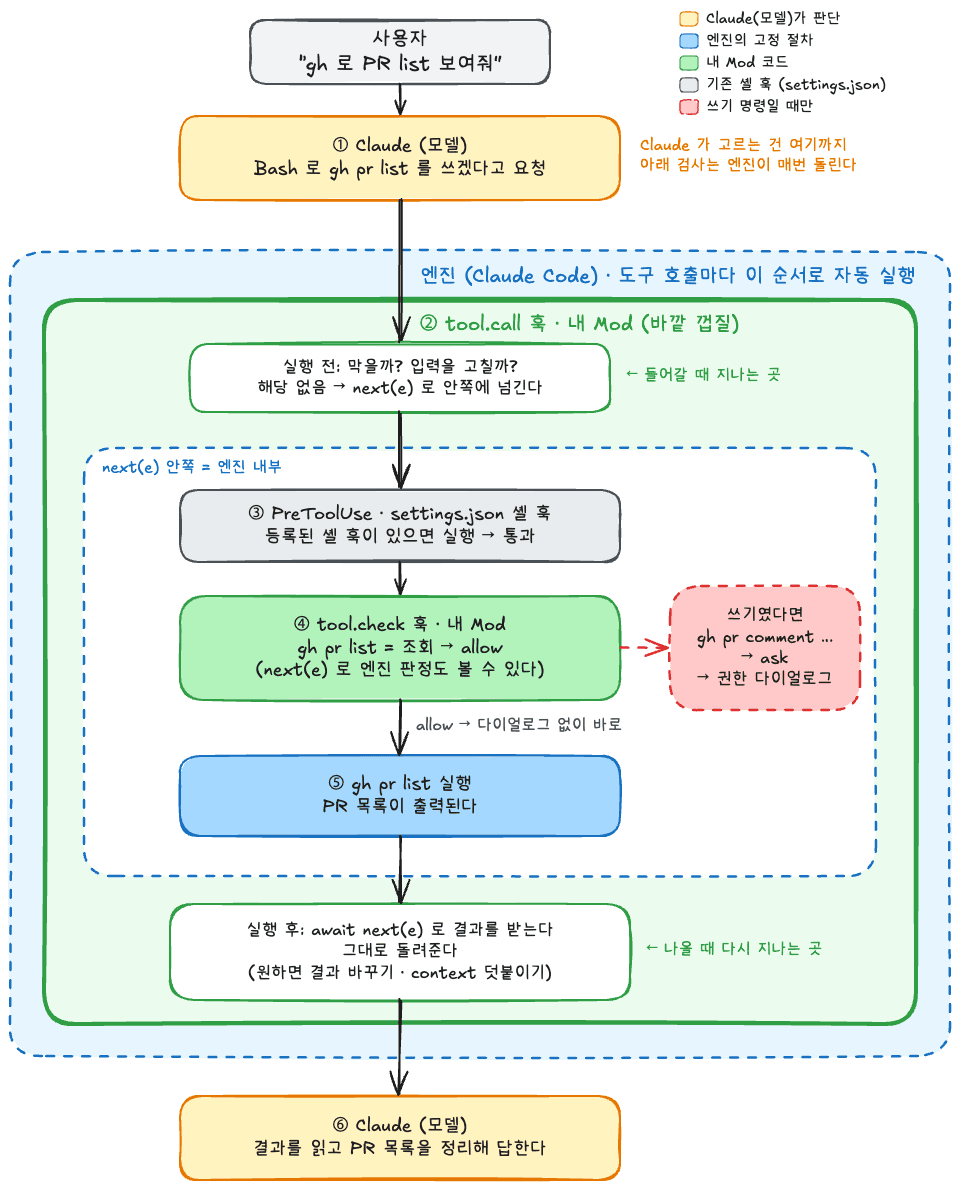
Looking at the diagram, at step 1, the Claude model returns a gh pr list request through the API,
-> at steps 2–5, Claude Code inspects and executes that request,
-> at step 6, it passes it to Claude, which reads it and responds to the user.
There are two places in the loop above that the user can control.
Skills · CLAUDE.md
Hooks · Mod
Hooks are shell scripts, while Mod is TypeScript that runs inside the engine.
The two differ in how forcefully they can be applied.
EX) "Always ask the user before using gh to write"
tool.check answers askIf Mod is merely appended to the prompt rather than used for verification, it behaves the same as an instruction.
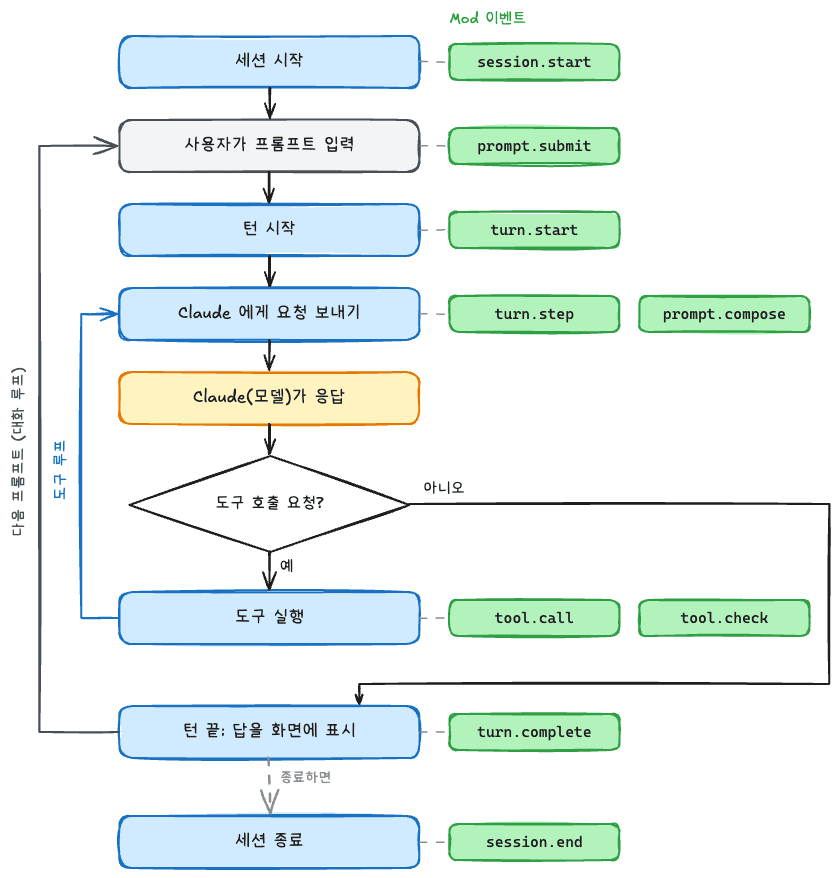
The names attached to each individual thing Claude Code does.
prompt.submittool.callturn.completeCode can be registered for each name.
(It is a kind of web onClick—when a button is pressed, the registered function runs.)
next(e)A function that passes control to the next step.
// e = 지금 하려는 일의 입력. 예: e.command === 'gh pr list'
on('tool.call', { tool: 'Bash' }, async ($, e, next) => {

  if (e.command.includes('rm -rf')) {
	// next 를 안 부름 → 명령은 실행되지 않는다
    return { deny: '위험한 명령' }
  }

  // 다음 차례로 넘긴다. 아래 단계(다른 훅, PreToolUse, 권한 판정 등)가 끝나면 결과가 온다.
  const result = await next(e)
  return result
})next(e) as the boundary, the upper side is before execution / the lower side is after execution.deny.tool.call, a tool can be blocked before execution, or its input can be modified.
{deny: '민감한 요청'} can propagate an error to Claude and pass along the reasonEX) Check commit message formats, or check before triggering a deployment workflow
After await next(e) in tool.call:
EX) A Gradle test normally responds only with BUILD SUCCESSFUL
-> Read the test result XML and add the number of tests that were executed
tool.check. allow / ask / deny
allow: Execute immediately without askingask: Confirm with the user through the permission promptdeny: Block it and pass the reason to Claude as an errorEX) Explicit control is possible, such as allow for gh api reads and ask for writes with -X POST·-f attached
prompt.compose and prompt.submit, rules or the current state can be sent with every request.EX) Inject context about Korean writing style only when Korean is present, and automatically add unanswered comments on the current PR.
turn.start, turn.completeEX) If a Java file changes during this turn, run a compilation check when the turn ends and report the result.
tool.register, agent.registerEX) Give Claude a tool such as "my PR list" without an MCP server. (In code, call them as $.tool.register, $.agent.register.)
It provides ways to make better use of the UI, including panels, a single line above the prompt, status lines, timers, sounds, and so on.
ui.render (draw a panel) · $.ui.status (status line) · $.ui.toast (notification) · $.clock.every (timer)EX) Display the status of my PRs in a panel and show a notification when a new review arrives.
This is an ambiguous area, but simply attaching a panel or a feature does not seem to be the best use of Mod.
I think it has meaning when it is tied to what Claude does, and visualizes or specifies it concretely.
The
command-logbelow tries three of these (recording before and after execution · permission decisions · screen).
Let's write a simple Mod.
We will make command-log, which records the Bash commands Claude executes.
/command-log to see the commands executed, whether they succeeded, and how long they took.12 · 1 failure for the command count in the status line.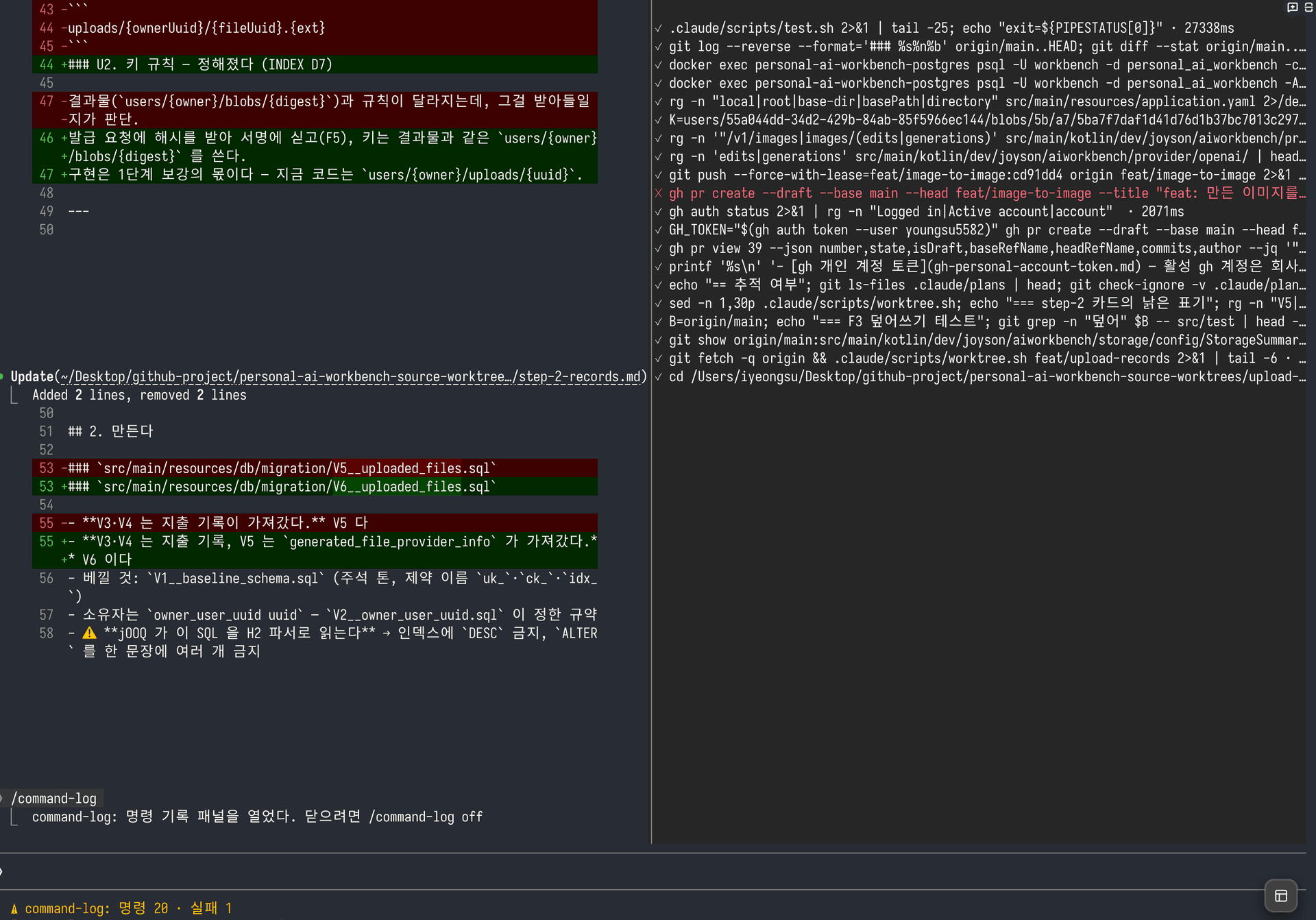
View the complete command-log example on GitHub
The Mod is structured as follows.
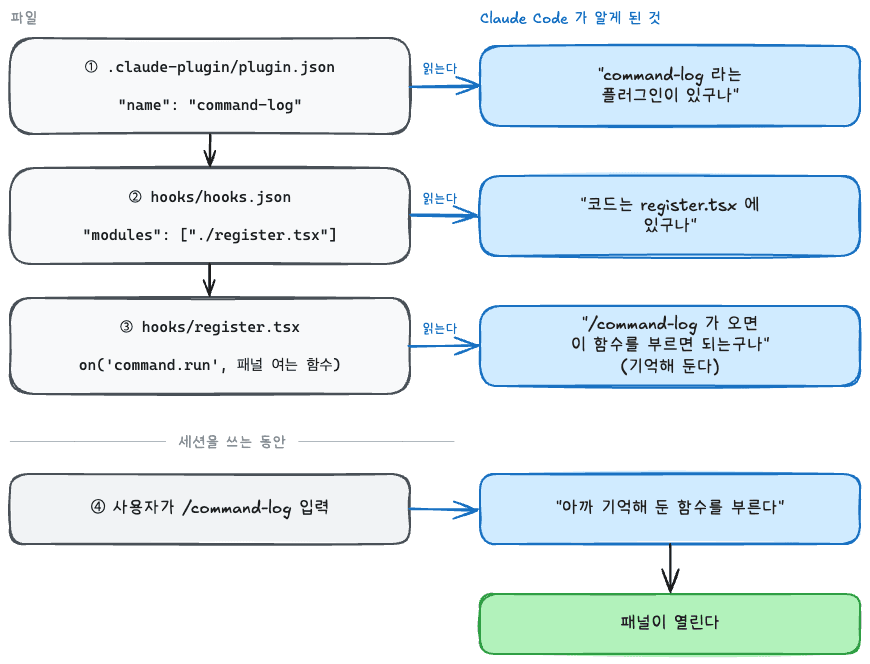
It indicates that this folder is a plugin. Without it, the folder is not read as a plugin.
{
  "name": "command-log",
  "version": "0.1.0",
  "description": "Claude가 실행한 Bash 명령을 패널(/command-log)과 상태줄에 보여주고, gh로 GitHub에 쓰는 명령은 실행 전에 묻는다",
  "types": "./types/index.d.ts",
  "userConfig": {
    "askGhWrite": {
      "type": "boolean",
      "title": "gh 쓰기 전에 묻기",
      "description": "gh로 PR 코멘트 · 이슈 생성 같은 쓰기를 하기 전에 권한 프롬프트를 띄운다",
      "default": true
    }
  }
}
Specify name, version, description, and types.
It tells Claude Code which code files to read.
Mod points to TypeScript files through modules.
{
  "modules": ["./register.tsx"]
}This is the body of the Mod.
When register is exported, Claude Code calls it once when reading the Mod. (It is called again during hot reload as well.)
export const register: Register = (on, options) => {
  const isAskGhWrite = options.askGhWrite !== false

  // 아래 1~6의 on(...)이 여기 들어간다
}on: A tool for registering a function for an eventoptions: The value the user entered in plugin.json-userConfigRegister the function to be called when a session starts. The function to register receives ($, e, next).
on('session.start', async ($, e, next) => {
  await $.command.register({
    name: 'command-log',
    description: 'Claude가 실행한 Bash 명령을 패널로 본다. off 를 붙이면 닫는다',
    argumentHint: '[off]',
  })
  return next(e)
})$: Used to ask Claude Code to do somethinge: Event informationnext: A function that passes control to the next stepMod code runs in an isolated place, so it cannot directly control Claude Code and makes requests through the API.
($.ui.status('PR 리뷰 요청'),$.process.run(['gh', 'api', ...]))
Register the slash command.
name: The command namedescription: The description shown in the command listargumentHint: A hint for the argument to append to the command; shown when you are about to enter it.Here, we only register the command. What it does is registered separately in
command.run.
on('command.run', { command: 'command-log' }, async ($, e) => {
  if (e.args.trim() === 'off') {
    await $.ui.close({ id: PANE })
    return { text: '명령 기록 패널을 닫았다.' }
  }
  await $.ui.open({ id: PANE, title: '명령 기록', focus: true })
  return { text: '명령 기록 패널을 열었다. 닫으려면 /command-log off' }
})
Register the function to be called when /command-log is entered.
e.args: Arguments added after the command{ text }: The text to display as the command's result$.ui.open only opens the panel. The function registered in $.ui.render is responsible for drawing in the panel.
records is the data for the list of executed commands.
import { atom, read, update } from 'claude-code'

const records = atom({ plugin: 'command-log', key: 'records' } as const, [])
export type CommandRecord = { command: string; isOk: boolean; ms: number }
declare module 'claude-code' {
interface PluginState {
'command-log': { records: CommandRecord[] }
}
}Write the value's type in types/index.d.ts.
Intervene before and after execution.
on('tool.call', { tool: 'Bash' }, async ($, e, next) => {

  const startedAt = await $.clock.now()

  const result = await next(e)
  const ms = (await $.clock.now()) - startedAt

  // 막혔거나, 실패한 경우
  const isOk = result.deny === undefined && result.isError !== true

  await update($, records,
	list => [...list, { command: e.command, isOk, ms }].slice(-MAX_RECORDS))

  $.ui.status(statusOf(await read($, records)))
  return result
}).catch(($, e, next) => next(e))
Whenever Claude runs Bash, record the elapsed time and whether it succeeded in records.
{ tool: 'Bash' }: Called only when executing the Bash tool
updateis a function provided by Claude.
Draw the panel.
on('ui.render', { component: 'Pane', requestId: PANE }, async ($, e) => {
  const { Box, Text } = $.ui.resolve(e)
  const list = await read($, records)
  return (
    <Box flexDirection="column">
      {list.length === 0 && <Text dimColor>아직 실행한 명령이 없다.</Text>}
      {list.map((one, index) => (
        <Text key={`record-${index}`} color={one.isOk ? undefined : 'error'} wrap="truncate-end">
          {one.isOk ? '✓' : '✕'} {one.command} · {one.ms}ms
        </Text>
      ))}
    </Box>
  )
})
{ component: 'Pane', requestId: PANE }: Called only when drawing this panel$.ui.resolve(e): Receives the components to draw from Claude Code.
Draw the returned value in the panel as-is.
=> Bash execution -> 4. update(records) -> records change -> 5. rendering called again -> read(records)
A specific feature can be explicitly controlled through a check.
on('tool.check', { tool: 'Bash' }, async ($, e, next) => {
  const command = (e.input as { command?: string }).command ?? ''
  if (isAskGhWrite && isGhWrite(command)) {
    return { decision: 'ask', reason: 'gh 로 GitHub 에 쓰는 명령이다' }
  }
  return next(e)
  // 판정하다 실패하면 묻기
}).catch(() => ({ decision: 'ask' }))
export const isGhWrite = (command: string): boolean => {
if (/\bgh\s+api\b/.test(command)) {
return /(-X|--method)[\s=]*(POST|PUT|PATCH|DELETE)\b/i.test(command) || /\s(-f|-F|--field|--raw-field|--input)\s/.test(command)
}
return /\bgh\s+(pr|issue)\s+(create|comment|edit|close|merge|review)\b/.test(command)
}e.input: The arguments of the tool to be executed. For Bash, { command }ask asks for permission, and reason displays the reason.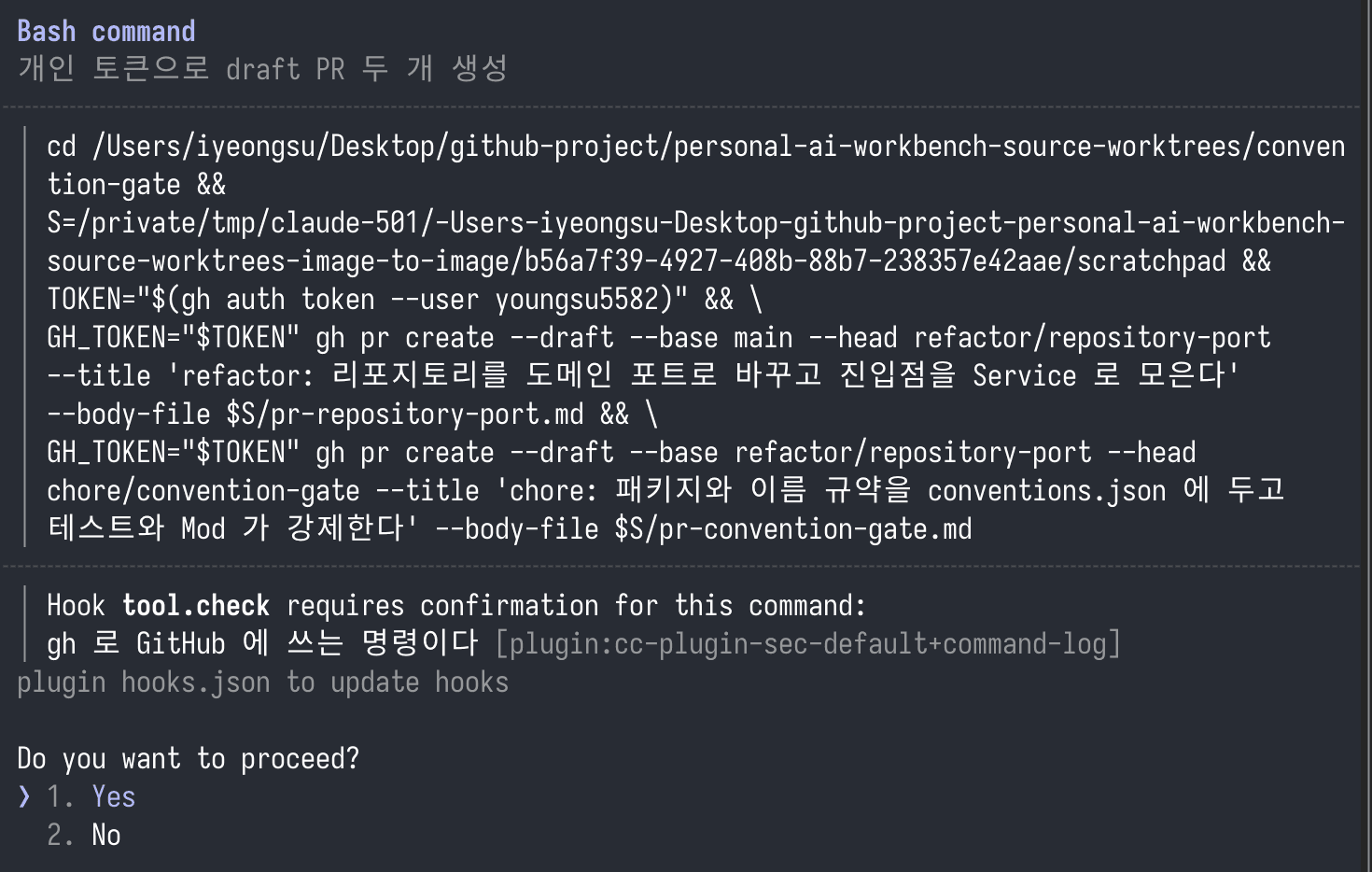
Hook tool.check requires confirmation for this command:
gh 로 GitHub 에 쓰는 명령이다
It is explicitly shown at the bottom as above.
Enter it in the prompt of a Claude Code session.
/plugin install command-log --marketplace youngsu5582/playgroundNaturally, if you implemented it yourself, change the
youngsu5582/playgroundaddress.
y for Add marketplace?, choose the installation scope, and it is enabled immediately for that session..claude-plugin/marketplace.json at the repository root makes this repository an installation list.{
"name": "youngsu5582-playground",
"description": "playground 에서 직접 돌려 보며 만든 Claude Code 플러그인",
"owner": { "name": "youngsu5582" },
"plugins": [{ "name": "command-log", "source": "./claude-mod-playground/command-log" }]
}/command-log.askGhWrite) with /plugin configure command-log.Mod is not a completely new feature.
It is similar to opening an interface so that users can intentionally control the existing tasks of Claude Code.
'Register a specific action at the desired event (tool.call, tool.check ...) so that it runs.'
This explanation is all there is to Mod.
"It can be shown in a panel, additional content can be injected into the prompt, and content can be manipulated."
Most things you want are possible.
As I wrote above, Mod has meaning when it is tied to what Claude does.
For example:
git push --force -> --force-with-lease)I think there will be possibilities like these.
I have:
Improved a POC by making a Mod that helps frontend developers deploy more easily and check the current status more easily: a 'development server deployment panel' and a Mod that lets them deploy with only mouse clicks.
Improved a POC by making a Mod that shows the status of my PR (who has reviewed it and whether additional comments were added after I incorporated the review) and the list of PRs I need to review.
Improved a POC by migrating rules enforced only through Hooks written as shell scripts and instructions in the existing Harness to Mod, increasing enforcement and visibility.
Improved a POC by making a Mod that shows timers and specifications helpful for individual study in order, while limiting what the AI can implement or answer directly.
I plan to try it more and leave a follow-up post if I find points where it can be useful after using it to some extent or enhancing Mod.