This English version was translated by Hermes Agent.
Tomcat does not compress responses with an ETag that does not have
W/. Make dynamic response ETags weak.
There is currently an API in our codebase that returns a large response.
It contains display data needed by the main logic. Since all of the data is required for the display, splitting it into multiple APIs immediately is not straightforward, so we return it from a single API.
Returning this response from the server every time would be inefficient, so we decided to apply caching and compression.
However, Spring can behave differently from what we intend if we configure or implement these features without fully understanding them.
Let's take a look at them one by one.
An identifier for a specific version of a resource. When the resource at a specific URL changes, a new ETag is generated.
With an ETag, a web server can avoid sending the body again when the resource has not changed.
There are two types of ETags.
ETag: "abc123"      ← strong
ETag: W/"abc123"    ← weak
If an ETag starts with W/, it is a weak ETag; otherwise, it is a strong ETag.
They mean the following:
If this tag is the same, the bytes are identical. Every byte, including insignificant ones, must be the same.If this tag is the same, the representations are semantically equivalent. The bytes may be different.ETags are commonly used for conditional GET requests and range requests.
If-None-Match: Send the ETag with the request. If it differs from the version the client has, request the body.
200 and the body.304 and an empty body.If-Range: Send an ETag together with a Range request. If the versions match, request the remaining body.
206 and only the requested byte range.200 and the entire body. A weak ETag is always treated as a mismatch; only a strong ETag is allowed.
206: Partial Content, indicating that the request for the data range specified in theRangeheader succeeded.
Each conditional header uses a different ETag comparison method.
| Header | Comparison method | Weak ETag |
|---|---|---|
If-None-Match | Weak comparison | Can be used for 304 revalidation |
If-Range | Strong comparison | Cannot be used for range requests |
When a response is large, a server tries to compress it whenever possible to reduce network outbound traffic.
server:
  compression:
    enabled: true
    mime-types: text/html,application/javascript,application/json
    min-response-size: 500
Spring Boot supports configuring options such as enabled, media types, and minimum size.
gzip is a representative way to compress and transfer data over HTTP. Its basic flow is as follows.
Accept-Encoding: gzip.Content-Encoding: gzip.The actual compression benefit depends on the payload and compression settings, so it should be measured directly on the production API.
curl -sS -D - -o /dev/null -w '%{size_download} bytes' URL
curl -sS -D - -o /dev/null -w '%{size_download} bytes' -H 'Accept-Encoding: gzip' URL
-D -: Display response headers on standard output.-w: Display the transferred body size.Content-Encoding, Vary, and ETag have the expected values as well.However, Spring does not compress responses directly just because of the YAML above.
Spring Boot starts the embedded Tomcat when it starts up.
Tomcat supports gzip compression only. To use Brotli, zstd, or similar formats, you need a server in front of it.
The YAML values are applied to Connector properties.
protocol.setCompression("on");                  // enabled: true
protocol.setCompressionMinSize(...);            // min-response-size
protocol.setCompressibleMimeType(...);          // mime-types
-> The embedded Tomcat Connector is responsible for deciding whether to compress and for performing the compression.
-> If the response has an ETag header and it does not start with W/, Tomcat's normal compression path skips the compression!!!
Tomcat's normal Connector compression path does not compress a response that has a Strong ETag. Let's understand why logically.
Assume that resource A exists and that its data will not change for a while.
리소스 A의 응답값: A
리소스 A의 gzip 을 해제한 응답값:     A
Whether it is compressed with gzip or not, the response value being used is the same: A.
리소스 A의 gzip 압축한 응답값: G-AHowever, when we look at the response bytes themselves, the gzip-compressed response value is G-A.
If the application creates the ETag from the body before compression, both responses will have the same ETag, E-A.
리소스 A 응답 헤더의 ETag: E-A
리소스 A 를 gzip 압축한 응답 헤더의 ETag:     E-A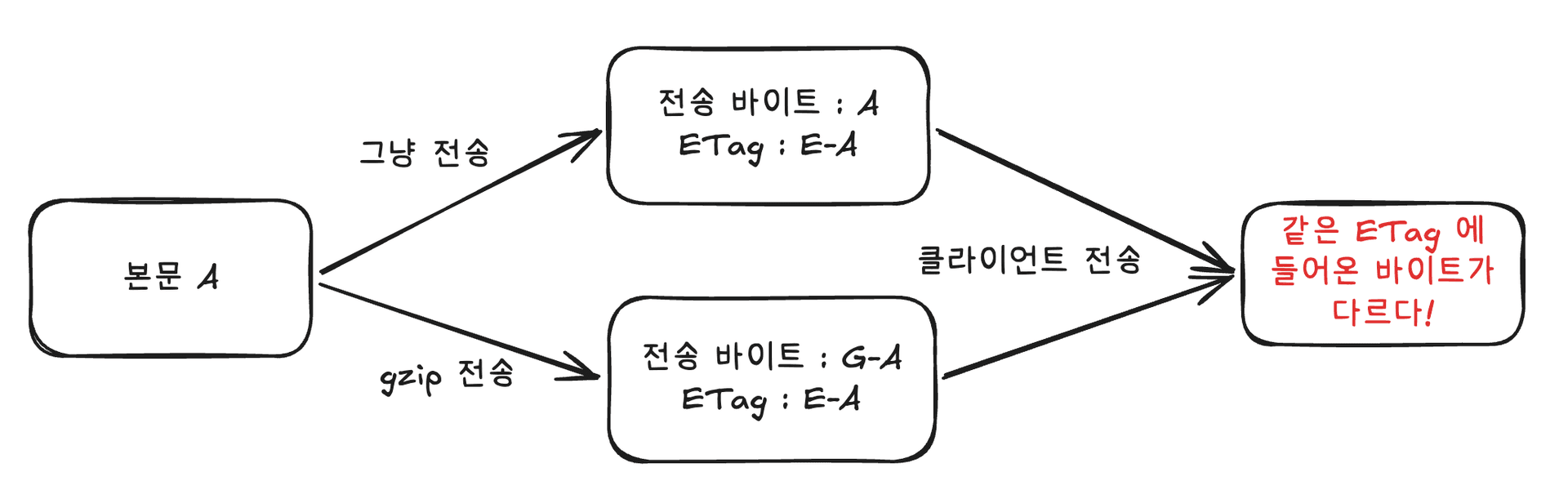
The meaning after decompression is the same, but the byte sequence of the representation data delivered over HTTP is different.
A Strong ETag is not a value that merely claims that two responses have the same meaning; it is a validator that indicates byte-for-byte identity.
=> If the same Strong ETag is attached to different bytes, it cannot preserve the meaning of a Strong ETag.
From Tomcat's perspective, the process can be summarized as follows.
noCompressionStrongETag: Determines whether responses with a strong ETag are eligible for compression; its default is true (do not compress).
true.
Spring provides ShallowEtagHeaderFilter, but if you want to apply it explicitly only to specific APIs, you may need to implement it yourself.
ShallowEtagHeaderFilteruses a Strong ETag by default, so you need to check whether compression still works. It also calculates the ETag after buffering the response, so applying it unconditionally to large responses may require consideration of memory usage and processing cost.
String WEAK_ETAG_PREFIX = "W/\"0";
char WEAK_ETAG_SUFFIX = '"';

byte[] bytes = objectMapper.writerWithView(jsonView).writeValueAsBytes(body);
StringBuilder sb = new StringBuilder(39);
sb.append(WEAK_ETAG_PREFIX);
DigestUtils.appendMd5DigestAsHex(bytes, sb);
sb.append(WEAK_ETAG_SUFFIX);
return sb.toString();
Serialize the response DTO with the same @JsonView and serialization settings as the actual response, create an MD5 digest, and add W/ from the beginning.
You also need to check whether the response DTO contains elements that vary from instance to instance.
Set<Permission> allowed = Set.of(Permission.READ, Permission.WRITE, Permission.DELETE);
The value above may produce a different hash for each instance! — Related note
In the controller, you only need to attach it.
When Spring MVC processes a ResponseEntity with 200 OK, it compares the ETag for GET or HEAD requests with the conditional request. If they match, it returns 304 Not Modified without a body.
var headers = new HttpHeaders();
headers.set(HttpHeaders.ETAG, etag);
headers.set(HttpHeaders.VARY, "Accept-Encoding");

return ResponseEntity.ok()
        .headers(headers)                      // W/"0..."
        .cacheControl(CacheControl.noCache())  // 캐시하되, 쓰기 전에 매번 재검증
.body(responseDto);If compression is not happening even though it is configured, check the response's ETag header.
If it starts with a Strong ETag without W/, Tomcat's normal Connector compression path does not compress that response.
If you want to keep the same application ETag before and after compression while using Tomcat compression, a Weak ETag is a practical choice. However, creating representation-specific Strong ETags is also valid when you can do so.
In addition, measure the API response size, Content-Encoding, Vary, ETag, and changes in the ALB's outbound cost together.
As request volume grows, these small differences can create significant cost savings.
The 400 I Mistook for a CORS Error — Logging Requests Rejected by Tomcat with a Valve
Upgrading to Spring Boot 3.5 Broke Our multipart Requests
How ControllerAdvice Handles Exceptions
SpringBootApplication Deep Dive (Why SpringBootApplication and EntityScan Should Be Specified Separately)