This post covers building an AWS infrastructure using only the Free Tier.
It utilizesRDS,EC2,ElastiCache,CodeDeploy,Chatbot,S3, andAmplify.
Amazon provides a surprisingly large number of services for free for one year.
(How great would it be if it were for two years...)
Here are some of the key offerings:
There are many more, of course.
Of course, there are a ton of other elements, but I've only listed the ones that a backend developer can easily approach.
Here, we will use Github Actions & CodeDeploy instead of CodeBuild & CodePipeline.
(Because 100 minutes is surprisingly short.)
This is the configuration plan for this time.
The configuration order below is:
VPC -> Database(RDS, ElastiCache) -> Amplify -> EC2 -> CodeDeploy
It seems easier to create the VPC first to avoid confusion in the configuration.
VPC: Virtual Private Network, determines which network to place our infrastructure in and how to arrange it.
Select VPC, etc.
The reason for having two private subnets is that RDS must guarantee 2 AZs. - Availability
And, you must enable
Enable DNS resolutionandEnable DNS hostnames.
-> This is because without DNS, an AWS EC2 instance cannot communicate with the outside world, even with a public IP. - Failed to resolve domain name to IP address (I was stuck here for about an hour or two).
Created for use with ElastiCache
Set up inbound and outbound rules for use with EC2 - RDS, Cache.
=> Specify in EC2
=> Specify in ElastiCache
=> Specify in EC2
=> Specify in RDS
These days, RDS also provides a template that can be easily configured for the free tier.
As you scroll down, there are elements you can choose from, so I'll skip the explanation.
I used Valkey instead of Redis here for the following reasons:
This part also provides elements to choose from, just like RDS, so I'll skip the explanation.
Here, VPC - Subnet Group - Subnet is required.
If you want to check if the server is running well,
from inside the VPC (i.e., run EC2 and from inside),
nc -zv <DB_HOSTNAME> <DB_PORT>If you send a request,
Connection to <DB_HOSTNAME> (<DB_IP>) <DB_PORT> port [tcp/redis] succeeded!it will respond.
This allows you to know if the DB is running and LISTENING properly and if the inbound-outbound connection between instances is established.
It seamlessly connects the frontend app from build to deployment.
Actually, I just learned about it properly this time, and it has a lot of great features.
If you push to Github, it receives a webhook and proceeds with the build and deployment.

The time for build and deployment is also very fast, about 2 minutes and 20 seconds. (Confirmed that disabling caching also works)
Amplify has WAF, which has elements for country restrictions, vulnerability and malicious attack protection.
It's an essential feature, but since it's not free tier, I'll pass (as of 2025.03.08).
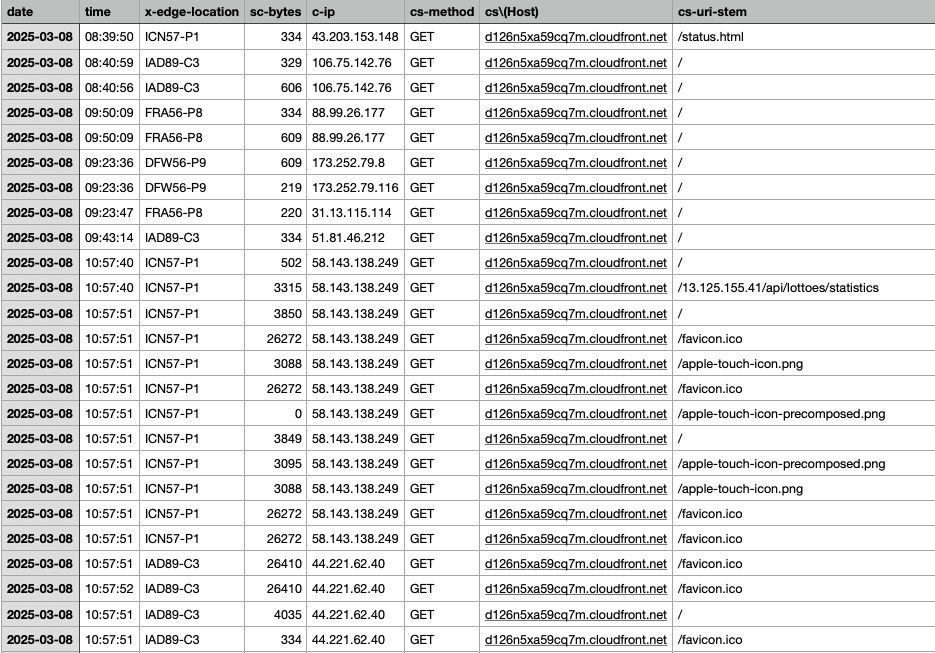
You can also easily download and view what kind of requests are coming to our server.
Instance settings:
Architecture: 64-bit (x86) - The free tier offering is currently fixed
Instance type: t2.micro - 1vCPU, 1GiB memory
Allow SSH traffic: From anywhere
Allow HTTP/HTTPS traffic from the internet
Storage configuration: 10GiB, gp3 root volume
Tag settings: profile - prod, project - lotto
Security group: ec2-public-group
You need to install Java and the Agent initially to run the server.
# Create JDK installation directory
sudo mkdir /usr/lib/jvm

wget https://download.java.net/java/GA/jdk21.0.2/f2283984656d49d69e91c558476027ac/13/GPL/openjdk-21.0.2_linux-x64_bin.tar.gz -O /tmp/openjdk-21.0.2_linux-x64_bin.tar.gz

# Unzip
sudo tar xfvz /tmp/openjdk-21.0.2_linux-x64_bin.tar.gz --directory /usr/lib/jvm
rm -f /tmp/openjdk-21.0.2_linux-x64_bin.tar.gz

# Set alternatives
sudo update-alternatives --install /usr/bin/java java /usr/lib/jvm/jdk-21.0.2/bin/java 100
sudo update-alternatives --set java /usr/lib/jvm/jdk-21.0.2/bin/java

# Set environment variables
export JAVA_HOME=/usr/lib/jvm/jdk-21.0.2
export PATH=$PATH:/usr/lib/jvm/jdk-21.0.2/bin

# Check
java -version
You can install it according to your version and vendor, and set the environment variables.
#!/usr/bin/env bash

sudo apt-get update -y
sudo apt-get install -y ruby
cd /home/ubuntu
wget https://aws-codedeploy-ap-northeast-2.s3.amazonaws.com/latest/install
chmod +x ./install
sudo ./install auto
And, install and run the CodeDeploy Agent.
Additionally, EC2 needs permission to run the CodeDeploy Agent.
Create a policy name in IAM policies and
give it EC2InstanceConnect, AWSCodeDeployFullAccess, and AmazonS3FullAccess permissions.
CodeDeploy will automatically proceed with the deployment by accessing the files in S3.
(InstanceConnect is for convenience) (If you are concerned about S3 permissions, you can just give GET permission.)
Actions -> Security -> Modify IAM role -> Set to the role we created.
t2.micro has 1.0 GiB of RAM. This is very desperate, so swap memory is needed.
sudo fallocate -l 2G /swapfilechmod 600 /swapfilesudo mkswap /swapfilesudo swapon /swapfileecho '/swapfile none swap sw 0 0' | sudo tee -a /etc/fstab (Specify to be set automatically even after rebooting)You can check if swap memory is enabled with
free -h.
If you don't want to deploy your site with a fixed IP or amplify.app, buy a domain.
Anyway, the new price for one year is really not that much.
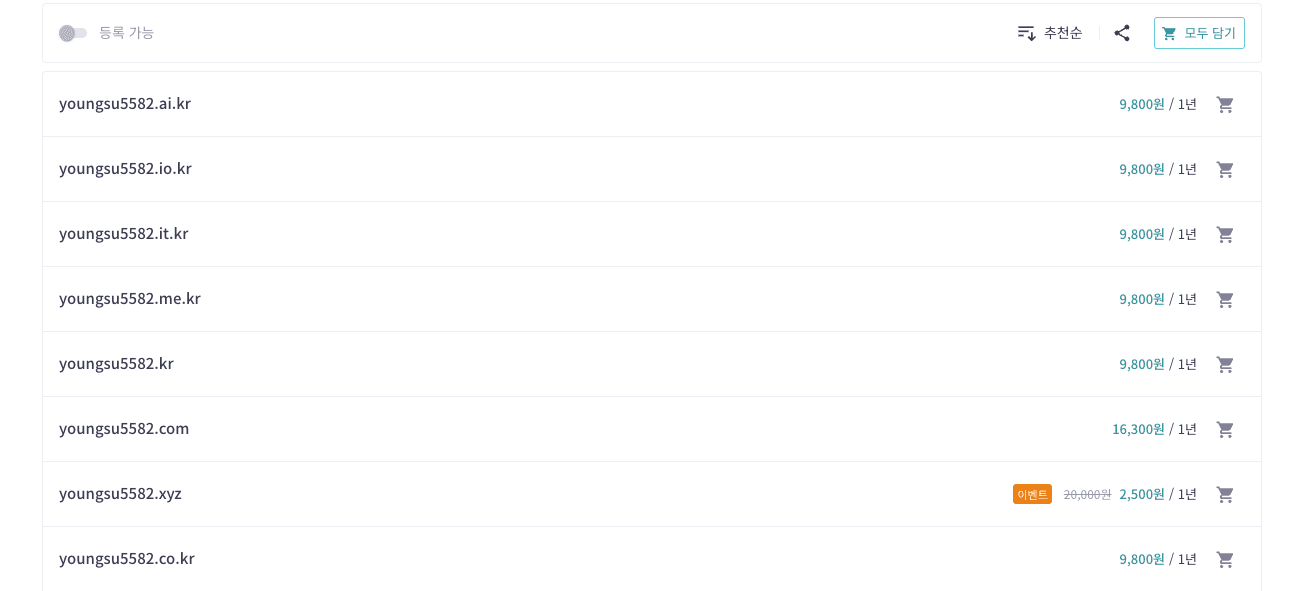
Isn't it worth giving up about 2,500-10,000 won for style?
To buy hosting, you need to enter administrator information, and since it goes up on whois or the DNS server to show who the owner of this site is, let's write it correctly.
Now, you can register the server's address as you like.

If you add our domain to a custom domain, it will automatically generate an SSL certificate.
Go to Hosting - Custom domains - Add domain and
host name, format, and data for registration with the hosting service, andcloudfront data to point to the subdomain.At this time, the important thing to note is that you have to extract the last DNS appropriately yourself.
For example, I was instructed to copy something likelotto.web.younsgu5582.life, but when I put it into the hosting server, I only had to put inlotto.web.
After that, the DNS information is propagated and the authentication is complete!
nslookup <domain_name>
whois <domain_name>
You can also check if the domain is registered correctly and if the information is registered well through these two.
On the server, we also apply it to receive HTTPS, not just plain HTTP.
(HTTP generally causes a Mixed Contents error when requesting HTTPS <-> HTTP, and the request is rejected.)
sudo apt-get update
sudo apt-get install certbot python3-certbot-nginx
sudo certbot --nginx -d <API_server_address>
If it asks you to enter y/n, enter y -> y -> n (the last one is about sending you news based on your email).
Through this process, you will be issued a certificate and receive fullchain.pem and privkey.pem.
Then, you can set ssl_certificate and ssl_certificate_key correctly in nginx.
server {
    listen 443 ssl;
    server_name <API_server_address>;

    ssl_certificate <fullchain.pem>;
    ssl_certificate_key <privkey.pem>;

    # (Optional) Strengthen SSL settings
    ssl_protocols TLSv1.2 TLSv1.3;
    ssl_ciphers HIGH:!aNULL:!MD5;

    location / {
        proxy_pass http://127.0.0.1:8080;
        # or root /var/www/html; etc. desired backend/static directory
        proxy_http_version 1.1;
        proxy_set_header Host $host;
        proxy_set_header X-Real-IP $remote_addr;
        }
}

server {
    listen 80;
    server_name <API_server_address>;
    return 301 https://$host$request_uri;
}
sudo nginx -t
sudo systemctl restart nginxAfter restarting to apply the settings, you can check if it responds by sending a request to the API server address.
I did not use CodeBuild or CodePipeline.
First of all, I felt that 100 minutes a month was surprisingly short.
A backend deployment generally takes about 2-3 minutes (it's faster if you exclude tests), so about 50-60 deployments would incur additional costs.
-> Therefore, I can't use CodePipeline either.
Instead, I decided to have Github Actions handle the build -> S3 upload -> Deploy execution.
Let's create an application.
Since we are using a single server, we will not consider deployment strategies and load balancers.
Create a user to run from Github Actions.
And, create an access key and
prepare the access key and secret key. (- Use case: local code)
- name: Create deploy package
  run: |
    zip -r deployment-package.zip build/libs/spring-lotto.jar appspec.yml deploy

- name: Configure AWS credentials
  uses: aws-actions/configure-aws-credentials@v4
  with:
    aws-access-key-id: ${{ secrets.AWS_ACCESS_KEY_ID }}
    aws-secret-access-key: ${{ secrets.AWS_SECRET_ACCESS_KEY }}
    aws-region: ${{ secrets.AWS_REGION }}

- name: Upload to S3
  run: |
    aws s3 cp deployment-package.zip s3://${{ secrets.S3_BUCKET_NAME }}/deployment-package.zip

- name: Deploy to CodeDeploy
  run: |
    aws deploy create-deployment \
      --application-name ${{ secrets.APPLICATION_NAME }} \
      --deployment-group-name ${{ secrets.DEPLOYMENT_GROUP_NAME }} \
--s3-location bucket=${{ secrets.S3_BUCKET_NAME }},key=deployment-package.zip,bundleType=zipAWS_ACCESS_KEY_ID
AWS_SECRET_ACCESS_KEY
AWS_REGION : ap-northeast-2
APPLICATION_NAME : lotto-code-deploy
DEPLOYMENT_GROUP_NAME : lotto-prod-group
S3_BUCKET_NAME : spring-lotto-build-bucketYou can check if it works by putting the values in the Secret like this.
It is very cumbersome to go in and check the deployment every time. We will use AWS Chatbot.

This is also free of charge.
It is now called Q Developer in chat applications.
Configure new client -> Select Slack -> Request permission for the channel you want to use.
And, let's configure the channel.
And, let's invite it to the channel with /invite @Amazon Q.
You also need to make additional settings in CodeDeploy.
Go to Application - Settings and create an alarm rule.
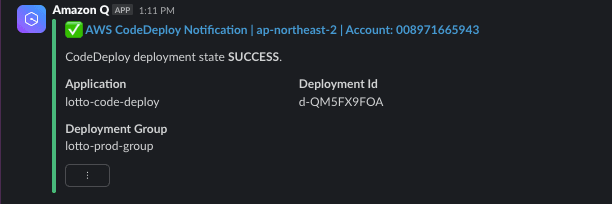
If you receive deployment permission like this, it is a success.
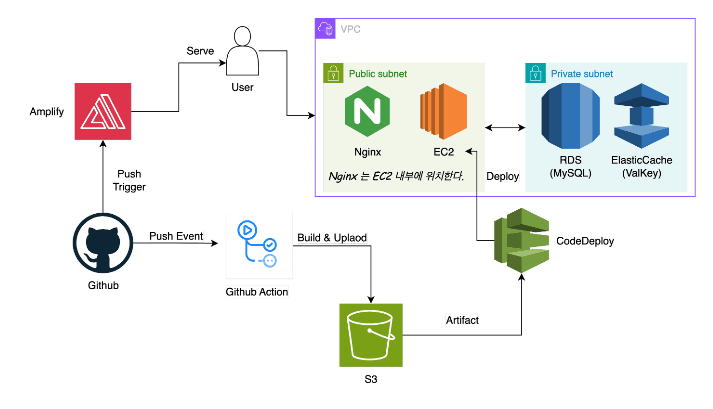
It turned out to be more plausible than I thought. 🙂 (CI, CD + DB + HTTPS, etc.)
Looking at the cost estimate?

You can see that it is less than $3.
I think I will introduce SNS or Lambda parts in the future.
I was hesitant to deploy my side project because of the cost and hassle,
but with a conscious free tier configuration, it is a very cheap amount. (Rather, the EC2 that I had prevented out of laziness was not covered by the free tier, so it was more expensive.)
I think it's good to enjoy all the features that AWS provides at least once.
Below are the trial and error I experienced while trying.
scp -i <key-pem> <file_to_transfer> <user>@<server_address>:<destination_filename_and_path>Let's transfer the necessary files through this.
mysql -h <RDS-endpoint> -u <db-username> -p < /home/ubuntu/big_inserts.sqlYou can move the file and send it to the DB.
The CodeDeploy elements are located in /opt/codedeploy-agent.
deployment-archive folder.It's best to set a budget in advance.
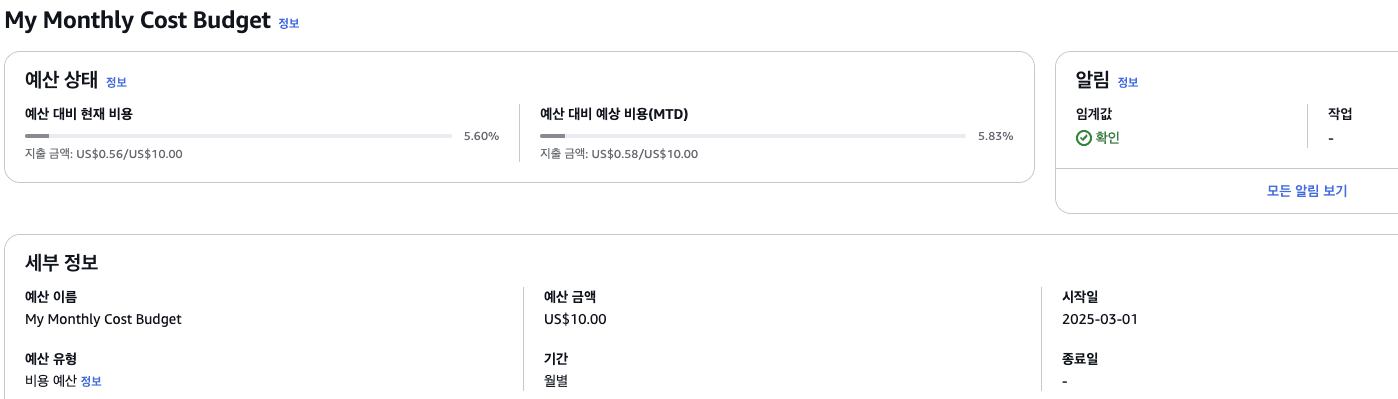
You can specify a threshold and receive an email when it is reached.
You can also easily receive an email if the current amount is not exceeded without additional settings.
(I set it to 50% & 80%.)