I still don't think I understand it clearly, so I'm learning by checking the code myself. 🙂
==, equalsint i1 = 1;
Integer i2 = 1;
Integer i3 = 1;
Long i4 = 1L;
long i5 = 1L;
System.out.println(i1 == i2);
System.out.println(i2 == i3);
System.out.println(i2.equals(i3));
System.out.println(i4.equals(i1));
System.out.println(i1 == i4);
System.out.println(i4.equals(i5)); What is the result of this logic?
true
true
true
false
true
true
The == comparison works in two ways.
Here, the reason i2 == i3 is true is that Integer manages values through caching, so it is considered the same.
Integer i2 = 1; is automatically converted to Integer.valueOf(1) when compiled.
public static Integer valueOf(int i) {
    if (i >= IntegerCache.low && i <= IntegerCache.high)
        return IntegerCache.cache[i + (-IntegerCache.low)];
    return new Integer(i);
}
// IntegerCache
static final int low = -128;
static final int high = 127; // Corrected from 128
static final Integer[] cache;If the value is within the range, it is created in the cache and returned.
The equals comparison also works in two ways.
System.out.println(var2.equals(Integer.valueOf(var1)));

public boolean equals(Object obj) {
    if (obj instanceof Integer) {
        return value == ((Integer)obj).intValue();
    }
    return false;
}
Numeric types like
IntegerextendNumber, notObjectdirectly (Numberimplicitly inherits fromObject).
equals provided by Object or an overridden equals.* @implSpec
* The equals method of the Object class implements the most stringent possible equivalence relation on objects.
* @apiNote
* When overriding the equals method, it is generally necessary to override the hashCode method as well.
public boolean equals(Object obj) {
return (this == obj);
}It is composed of ==, which checks if two objects are physically the same object (point to the same memory address).
int i1 = 1;
Long i4 = 1l;

System.out.println(i4.equals(i1));
System.out.println(i1 == i4);
What if we compare a Long and an int?
System.out.println(var4.equals(Integer.valueOf(var1)));
System.out.println((long)var1 == var4);
When the code is compiled, it is automatically type-converted and boxed with Integer.valueOf.
public boolean equals(Object obj) {
    if (obj instanceof Long) {
        return value == ((Long)obj).longValue();
    }
    return false;
}
Since instanceof is not Long, it returns false.
Since (long)1 == 1l, it returns true.
Integer i6 = Integer.valueOf(128);
Integer i7 = Integer.valueOf(128);
System.out.println(i6 == i7);
System.out.println(i6.equals(i7));
The reason the above returns false, true is that the cache is not applied, so the addresses are different, but the values are the same.
String s1 = "cache";
String s2 = "cache";
System.out.println(s1 == s2);
So, what about strings, which are not numbers?
Shouldn't it be false since they are different objects?
-> The answer is true.
Similar to Integer above, there is a String Buffer Pool inside the JDK for strings.
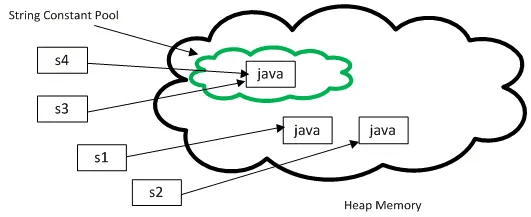
That's all there is to it, as shown in the picture. However, it is important to note that when creating an object through new String(...), the string value is not stored.
This is because once a string literal is created, it cannot be changed. Therefore, it exists to save time that would be spent on efficient memory usage and creating strings every time.
This value first goes into the Constant Pool at compile time.
Constant pool:
...
    #7 = String             #8             // human-cache
    #8 = Utf8               human-cache
At class loading time, it reads this value and interns the string literal into the String Pool.
0: ldc #7 // String cache
When executed, the bytecode gets the String value from the String Pool with the ldc command.
(Even if you declare the literal multiple times, it gets the same literal.)
This content is already well explained in the official Oracle documentation.
Nested Class
Reasons for using it:
public class Human {
    String name;

    static class StaticInner {
        String name;

        public StaticInner(final String name) {
            this.name = name;
        }
    }

    class Inner {
        String name;

        public Inner(final String name) {
            this.name = name;
        }
    }
}
Human.StaticInner staticInner = new Human.StaticInner("Static Inner");
Human human = new Human("Human");
Human.Inner inner = human.new Inner("Inner"); Static can be created from the outside, and Inner can be created through human.
I was curious about why it is used, and I got a little hint from Can a Java inner class be a Spring bean?.
An inner class, literally, cannot be a static class.
-> The correct question is whether a nested class should be made a static class.
A static class, although placed inside, is the same as placing it as a top-level class on the outside.
-> It is attached when it is very deeply involved with the Outer Class in terms of meaning.
(Approaching it from the opposite of the reason for separating packages - when it is very deeply involved, and the Inner-Outer relationship is not a major concern from the outside.)
-> Readability improves.
private.An inner class cannot be created without an instance of the outer class.
InnerClass innerClass = outerClass.new InnerClass();
It is said that an inner class is used when creating a monitoring bean by collecting information from the Outer Class.
These classes are created as separate files when compiled with javac. (That is, they are also loaded separately.)
It stands for Java Archive.
It allows us to bundle the Java code we have created and run it.
Main-Class: joyson.jar.JarMain
You can specify the Main Class that needs to be executed in the MANIFEST.
You can read this information at runtime with the
PackageAPI.
Compile to the out folder with the command javac -d out/ src/main/java/joyson/jar/*.java
->
jar cfm MyJar.jar src/main/java/joyson/jar/manifest.txt -C out .
c: create, create a new JAR filef: file, recognize the next argument as the JAR file namem: manifest, means to use a manifest file (management file)-C: move to the out/ directoryView the list with jar tvf MyJar.jar
 0 Fri Mar 07 20:39:24 KST 2025 META-INF/
95 Fri Mar 07 20:39:24 KST 2025 META-INF/MANIFEST.MF
 0 Fri Mar 07 20:36:48 KST 2025 joyson/
 0 Fri Mar 07 20:36:48 KST 2025 joyson/jar/
500 Fri Mar 07 20:36:48 KST 2025 joyson/jar/JarMain.class
864 Fri Mar 07 20:36:48 KST 2025 joyson/jar/JarUtils.class
You can check the dependencies of the JAR file with jdeps MyJar.jar.
lotto.controller                                   -> lotto.service                                      spring-lotto-0.0.1-SNAPSHOT.jar
lotto.controller                                   -> lotto.service.dto                                  spring-lotto-0.0.1-SNAPSHOT.jar
lotto.controller                                   -> order.domain.vo                                    spring-lotto-0.0.1-SNAPSHOT.jar
lotto.controller                                   -> org.springframework.web.bind.annotation            not found
lotto.controller                                   -> purchase.domain                                    spring-lotto-0.0.1-SNAPSHOT.jar
It tells you the path in detail.
Unpack the jar file with jar xvf MyJar.jar (it unpacks into .class files).
Next time, I should try to approach heap dumps or Java configuration-related topics. (I still feel I'm lacking.)